OpenAI Dots explained: always-on AI agents, what they do and what they cost
OpenAI's Dots are GPT-6 Astra agents that keep working on their own cloud computers. Here is how they compare with Microsoft's Copilot Autopilot and self-hosted OpenClaw.
इस पोस्ट में8 sections
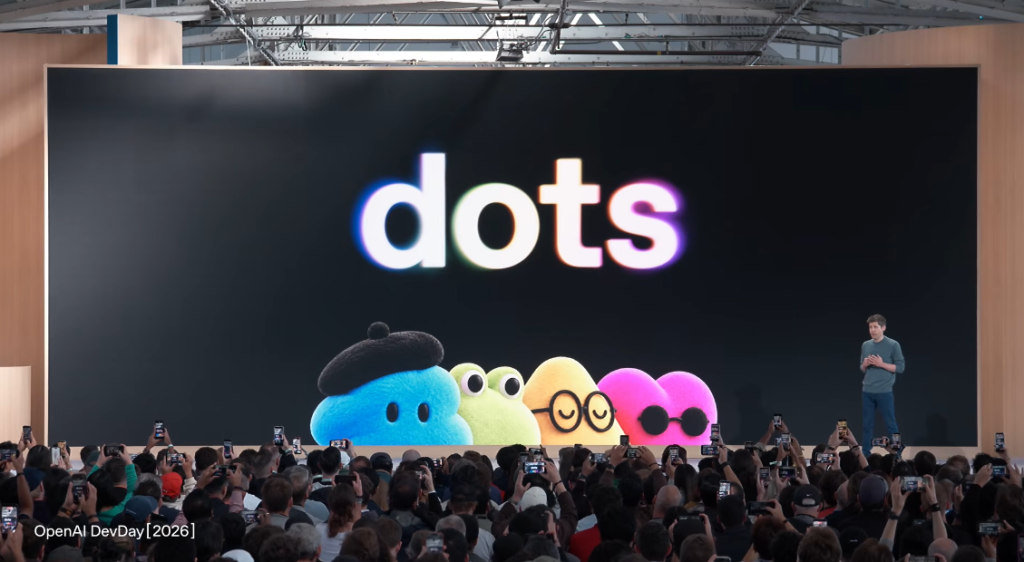
OpenAI launched Dots at its DevDay event in San Francisco on 29 September 2026: personal AI agents, powered by a new model called GPT-6 Astra, that keep working on your tasks after you close the chat window. That is the big shift with OpenAI Dots AI agents. You stop asking a chatbot questions and start handing work to something that gets on with it, sometimes while you sleep.
Microsoft announced something very similar four days earlier, and open-source projects like OpenClaw have been doing a rougher version since late 2025. So this explainer covers what a Dot actually does, who can get one, and how it compares with the alternatives.
What a Dot is, in plain words
An AI agent is software that can take actions for you, not just reply. It can open apps, click around, write files and send things. A Dot goes a step further because it is always on: according to OpenAI's announcement, each Dot gets its own cloud computer and web browser, can work toward your goals 24/7, and learns your preferences and working standards from your feedback over time.
Here is what OpenAI has confirmed so far:
- Model: GPT-6 Astra, announced alongside Dots at DevDay.
- Apps: connects to more than 4,000 apps through OpenAI's plugin ecosystem.
- Where you reach it: ChatGPT on desktop, web and mobile, plus Slack and Teams. You can message it or call it by voice. Text message (SMS) support is listed as coming later.
- Teamwork: you name and personalise your main Dot, several Dots can work together, and OpenAI is testing "specialist Dots" with their own identities, credentials and tools for specific business roles.
- Usage: chats with a Dot do not count toward your normal ChatGPT usage limits.
The examples OpenAI and early coverage have shown include monitoring customer feedback, investigating and fixing software bugs, rerunning scientific analyses, and one where a Dot noticed a missing invoice, prepared it, and sent it only after getting approval. TechCrunch notes the main targets right now are software developers and scientists, wrapped in a deliberately bubbly, cartoon persona.
Who gets OpenAI Dots, and what it costs
Your first Dot is included at no extra cost on ChatGPT Pro and Business Premium in eligible markets. On Enterprise, Edu and Healthcare workspaces, Dots are a beta that is off by default until an administrator turns it on. Extra Dots and bigger monthly allowances are promised for later, with no price announced.
The plans themselves are not cheap. As tracked by AI Tools Review, ChatGPT Pro now comes in $100, $200 and $500 a month tiers in the US, and Business Premium costs $125 per seat per month, or $100 if billed annually. The same outlet reports that in the UK, Pro does not include Dots while Business Premium does, so regional rules vary.
Dots vs Microsoft Copilot Autopilot vs OpenClaw
Microsoft unveiled a redesigned Copilot app on 25 September 2026 with a new Autopilot tab, a rebrand of its earlier Scout project. AlternativeTo describes it as a persistent cloud assistant that can watch Teams channels, run recurring tasks and handle follow-ups while you are offline. OpenClaw is the do-it-yourself option: free, open-source software you run on your own hardware. Here is how the three line up.
OpenAI Dots
- Cost: first Dot included with Pro (from $100/month) or Business Premium ($125/seat/month).
- Where it runs: OpenAI's cloud, on a dedicated cloud computer per Dot.
- What it can touch: 4,000+ connected apps, a browser, ChatGPT, Slack and Teams.
- Who it suits: power users, developers, researchers and small teams already paying for top ChatGPT plans.
Microsoft Copilot Autopilot
- Cost: usage-based Copilot Credits, not a flat per-seat fee, so long-running tasks can add charges beyond a normal Copilot licence.
- Where it runs: Microsoft's cloud, inside your organisation's Microsoft 365 tenant, with its own Entra ID identity, storage and workspace.
- What it can touch: Teams, Outlook and shared documents via @mentions. Email and calendar access needs separate accounts and licences, and sensitive actions can require human approval.
- Who it suits: companies that live in Microsoft 365. It is in private preview for Frontier tenants, with no general release date yet.
OpenClaw (self-hosted)
- Cost: the software is free under the MIT licence, but you pay for the AI model you plug in (usually per use), plus any server you run it on.
- Where it runs: your own computer or server.
- What it can touch: potentially everything: files, shell commands, email, calendars, the web, and chat apps like WhatsApp, Telegram, Discord and iMessage.
- Who it suits: tinkerers who are comfortable securing a server and want full control. Not a beginner tool.
In short: Dots is the easiest personal option if you already pay for ChatGPT, Autopilot is built for IT departments that want audit trails, and OpenClaw gives you the most freedom with the most responsibility. DevX points out that Microsoft's design resembles OpenClaw, but Microsoft built its own system to prioritise enterprise governance and audit logging.
The honest part: agents still make mistakes
An agent that works without you also makes mistakes without you. OpenAI says so itself: its safety notes for Dots say they "can still make mistakes, so always review consequential work." Some things, such as password changes, always stay with the user, and some research tools are read-only.
- Prompt injection: a webpage or email can hide instructions that trick an agent into leaking data. OpenClaw has already been hit by flaws of this kind, according to TechTarget.
- Bad add-ons: TechTarget reports that a malware campaign called ClawHavoc found about 12% of skills on OpenClaw's ClawHub plugin store were malicious. Any agent with thousands of app connections has a bigger attack surface.
- Surprise bills: Autopilot bills through Copilot Credits with no per-seat cap, so DevX advises setting spending limits before switching it on.
- Too much access: the more apps you connect, the more damage one misunderstood instruction can do.
The safe habit with any of these is the same: give an agent the smallest access it needs, keep approval turned on for anything that sends money or messages, and check its work for the first few weeks. Our 60-Minute Privacy & Security Reset walks through tightening the accounts you might connect.
What to do next
If you are on ChatGPT Pro or Business Premium, look for Dots in the app and start it on one low-stakes, repeating job, like a weekly summary of customer feedback, before trusting it with invoices or code. If you are in India or on a cheaper plan, wait for OpenAI to confirm markets and the price of extra Dots. Microsoft users should ask IT whether their tenant is in the Frontier preview. And if you want to try agents without a $100 monthly bill, our guide to building AI agents without code is a cheaper way to learn how they work.
स्रोत
- OpenAI: Introducing dots
- OpenAI: Safety, security and privacy in dots
- TechCrunch: OpenAI launches Dots, its bubbly agentic avatar
- DEV Community: OpenAI DevDay 2026, every announcement with prices and availability
- FoneArena: OpenAI introduces dots with GPT-6 Astra and access to 4000+ apps
- AI Tools Review: ChatGPT pricing, every plan compared (October 2026)
- AlternativeTo: Microsoft redesigns its Copilot desktop app with Home, Code and Autopilot tabs
- DevX: Microsoft Copilot Autopilot explained
- TechTarget: The OpenClaw security risks every CISO needs to know
- Verdent: OpenClaw pricing guide
काम का लगा? इसे उस व्यक्ति को भेजें जिसे यह पढ़ना चाहिए।