ChatGPT Ads Can Use Your Prompts, Email and Phone: What to Turn Off
404 Media found advertisers can target ChatGPT users with uploaded emails, phone numbers and what you type. Here's what the ad settings actually stop, and which Indian plans skip ads.
इस पोस्ट में8 sections
- What 404 Media found when it bought ChatGPT ads
- What advertisers can and can't see
- How to turn off ChatGPT ad personalisation, and what it really does
- Two more settings worth changing
- Turn off 'Improve the model for everyone'
- Use Temporary Chat for anything personal
- Which ChatGPT plans have ads in India
- What to do now
Advertisers on ChatGPT can aim ads at you by uploading your email address or phone number, and also by matching against what you are asking the chatbot right now. That's from tests published by 404 Media on 15 October 2026. If you use ChatGPT for free or on the ₹399 Go plan in India, you are in the group that sees ads. So here is what you can turn off, and what no setting will stop.
What 404 Media found when it bought ChatGPT ads
Reporter Joseph Cox and his team ran two ad campaigns themselves so they could see what advertisers get. Ironically, the ads warned that ChatGPT isn't private. Coverage of the report by MobileSyrup and others lays out how the targeting works:
- Customer lists: advertisers can upload email addresses and phone numbers, either plain or scrambled (hashed), plus phone advertising IDs. OpenAI then checks which ones belong to ChatGPT accounts.
- A 25,000 minimum: a list has to match at least 25,000 ChatGPT users before an advertiser can use it to include people. Smaller lists can only be used to leave people out.
- Context hints: advertisers describe the kinds of conversations, topics or keywords where their product fits. 404 Media's hints aimed at people asking about privacy or about AI in general. OpenAI says hints guide matching but are not exact keywords and don't guarantee an ad will show.
OpenAI told 404 Media that uploaded lists are deleted after processing, usually within 24 hours. It also said being on a list does not by itself trigger an ad, and advertisers can't see which individuals matched.
What advertisers can and can't see
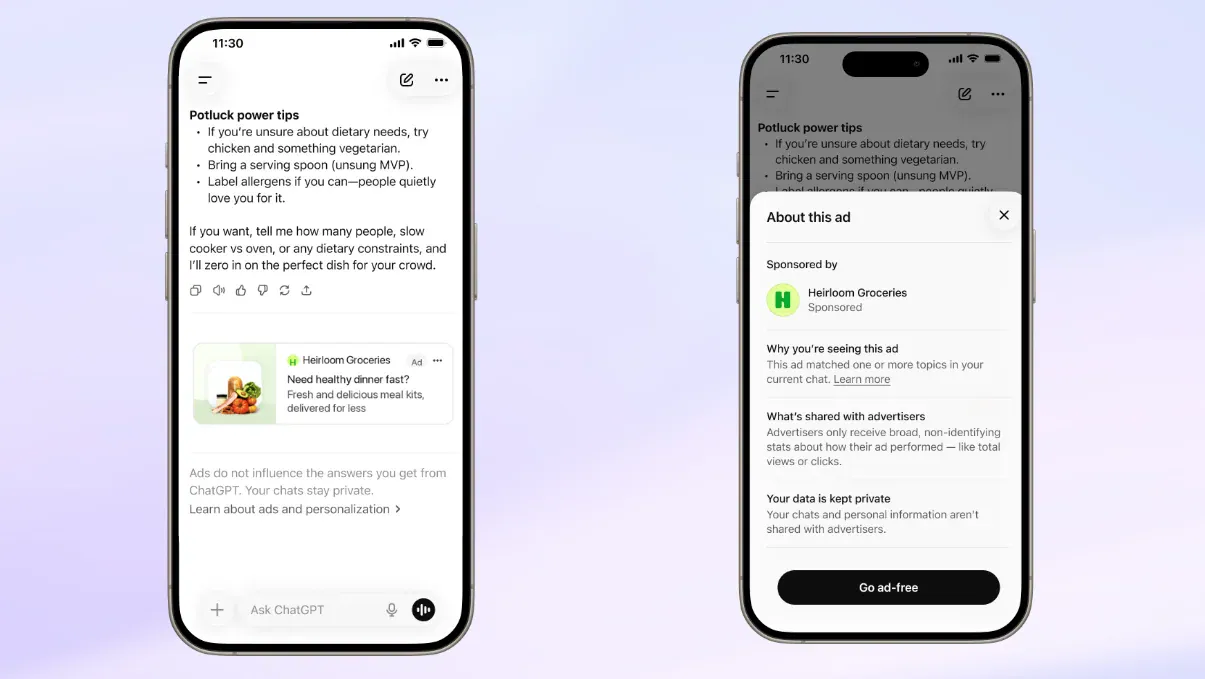
According to OpenAI's Ads in ChatGPT help page, advertisers never receive your chats, chat history, memories, name, email, precise location or IP address. They get overall performance numbers, like how many people saw or clicked an ad.
The catch is the other direction. Advertisers don't need to see your chats for your chats to decide which ad you get. OpenAI does that matching on its side. And if a shop already has your email from a past order, it can bring that list to ChatGPT.
OpenAI says ads won't appear near sensitive topics such as personal health, mental health or politics, it doesn't currently allow political ads, and accounts it believes belong to under-18s get no ads. Ads sit below the answer, are labelled as sponsored, and OpenAI says they don't change what ChatGPT tells you.
How to turn off ChatGPT ad personalisation, and what it really does
On Free and Go accounts in regions where ads are live, the switch is in Settings > Ad controls. From there you can turn off ad personalisation, see why an ad was shown, hide ads and clear your ads data.
Here's the part most people miss. Turning personalisation off stops ChatGPT from using your other chats, memory and ad history to pick ads. It does not stop ads based on the chat you are in right now. The setting itself says ads "may still be based on your current chat," as 404 Media pointed out.
So if you ask about running shoes, you can still get a running shoe ad. What changes is that last week's chat about your knee won't follow you around.
OpenAI hasn't clearly said whether this switch also takes you out of advertisers' uploaded email and phone lists. Treat that as unconfirmed.
Two more settings worth changing
Ad controls only cover ads. These two settings deal with what happens to your conversations more broadly.
Turn off 'Improve the model for everyone'
- Open ChatGPT and tap your profile, then Settings.
- Go to Data controls.
- Switch off Improve the model for everyone.
This stops your new chats from being used to train OpenAI's models. It works across your devices when you're signed in, and your chats still stay in your history. It doesn't remove ads, and it doesn't pull back data that was already used. The training opt-out exists on every consumer plan, including Plus and Pro, so paying to skip ads doesn't automatically opt you out of training.
Use Temporary Chat for anything personal
Start a new chat and tap the Temporary Chat option at the top. These chats don't show up in your history, don't create or update memories and aren't used for training, though OpenAI may keep them for up to 30 days for safety checks. If you save a temporary chat, it becomes a normal chat with your usual settings.
Privacy app maker Maple, citing OpenAI's help pages, says temporary chats don't show ads. We couldn't open OpenAI's own page to confirm that, so check for yourself the next time you use one.
Which ChatGPT plans have ads in India
Ads reached India in the last week of August 2026, according to tbreak, after a US test that started in February and later expanded to the UK, Mexico, Brazil, Japan and South Korea.
- Free: has ads, for logged-in adults.
- Go (₹399 a month): has ads. There's no ad-free switch on Go.
- Plus, Pro, Business, Enterprise and Edu: no ads.
Free users get one more choice. According to OpenAI's help page, Free accounts can switch to an Ads-Free mode under Ad controls. It removes ads at no cost, but you get lower usage limits and fewer features. OpenAI hasn't published the exact message cap. You can switch back from the same menu.
What to do now
If you only have five minutes: turn off ad personalisation, switch off 'Improve the model for everyone', and get in the habit of using Temporary Chat for health, money or relationship questions. If ads bother you more than limits do and you're on Free, try Ads-Free for a week and see if the lower cap actually affects you.
The bigger thing to watch is whether OpenAI answers 404 Media's open question about how it stores the raw emails and phone numbers advertisers upload. If you want a broader clean-up beyond ChatGPT, our 60-Minute Privacy & Security Reset walks through the settings that matter across your phone and accounts.
स्रोत
- Ads in ChatGPT (OpenAI Help Center)
- Our approach to advertising and expanding access to ChatGPT (OpenAI)
- Data controls in ChatGPT (OpenAI Help Center)
- How ChatGPT targets ads to you based on your prompts, phone number and email (404 Media)
- ChatGPT lets advertisers target you based on your personal info (MobileSyrup)
- OpenAI brings ChatGPT ads to India's Free and Go tiers (tbreak)
- ChatGPT ads roll out in India (Business Standard)
- Is ChatGPT private? (Maple)
काम का लगा? इसे उस व्यक्ति को भेजें जिसे यह पढ़ना चाहिए।


