Nothing OS 5.0 (Android 17): Best New Features and Which Phones Get It
Stable Nothing OS 5.0 started reaching the Phone (3) on 12 October. Here are the best new features, the update date for each Nothing phone, and how to check for it.
In this post13 sections
- Nothing OS 5.0 features worth trying first
- 1. A see-through look called Lucent
- 2. Geist becomes the main font
- 3. Split notifications and Quick Settings
- 4. New lock screen clocks
- 5. A proper Glyph app and new widgets
- 6. Essential Apps Builder: make an app by describing it
- 7. Smaller changes that add up
- Nothing OS 5.0 release date for every eligible phone
- How to check for the Nothing OS 5.0 update
- The early verdict: the look works, the haptics don't yet
- What to watch next
- Where to buy
Nothing started rolling out stable Nothing OS 5.0, its version of Android 17, to the Nothing Phone (3) on 12 October 2026. If you own a Phone (3), you can get it now. Owners of the Phone (3a), (4a) and (2a) have a date to look out for in November, and some older phones won't get it at all.
Nothing says the update has more than 80 changes. Below are the ones you'll actually notice, the update window for each phone, and how to check whether it has reached yours.
Nothing OS 5.0 features worth trying first
1. A see-through look called Lucent
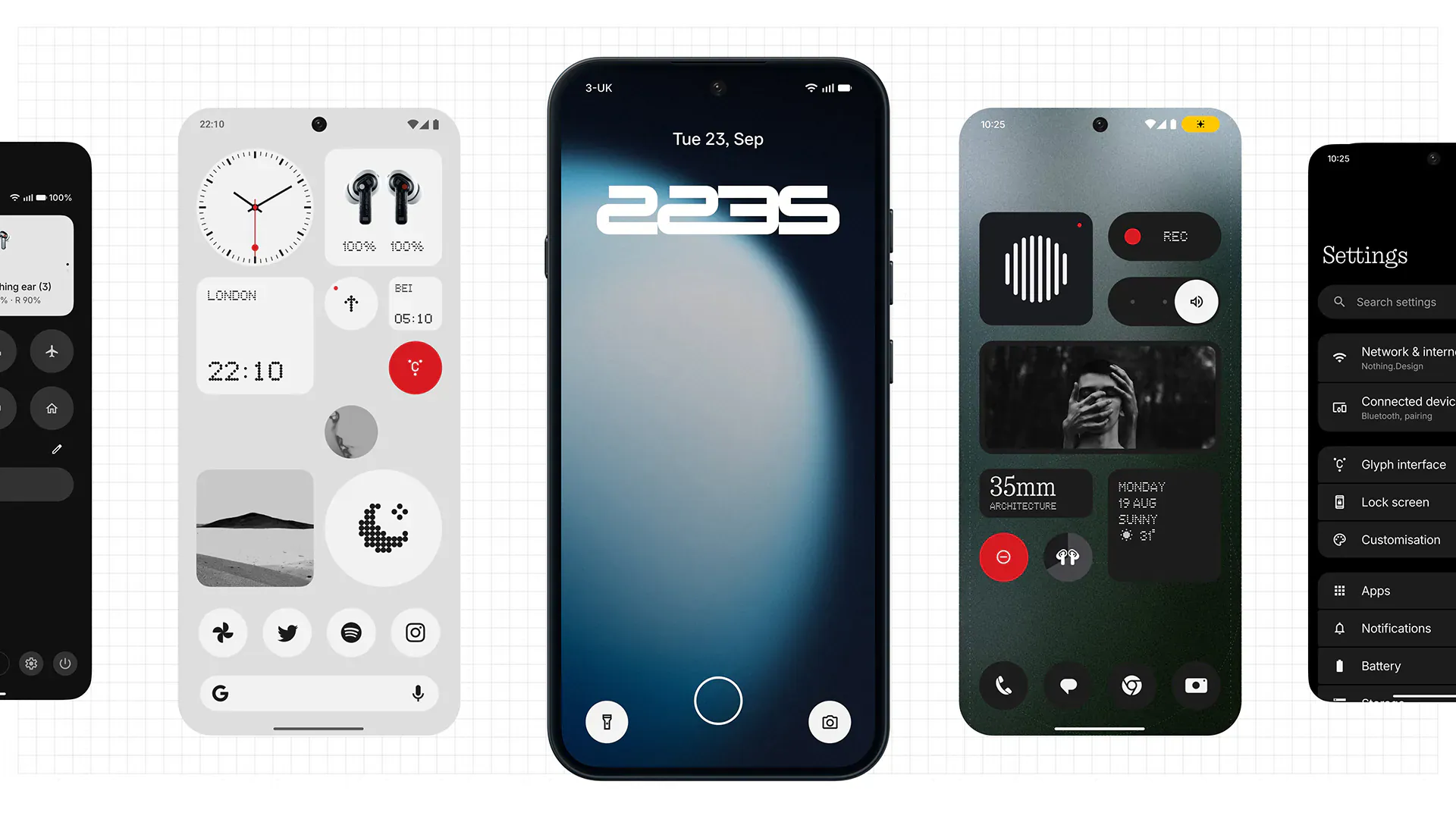
The biggest visual change is a frosted, see-through style that Nothing applies to widgets, the search bar and its own apps. Beebom calls it the Lucent theme. App icons and the small 1x1 Quick Settings widgets can take on colours from your wallpaper, but the phone still looks mostly black and white. The theme is optional, so you can stick with the classic look.
2. Geist becomes the main font
Nothing's dot-matrix font now appears only in a few places, and Geist, a cleaner typeface, does most of the work. Day-to-day text is easier to read, and icons, spacing and animations have been tidied up in Settings, Camera, Gallery and the status bar.
3. Split notifications and Quick Settings
This change comes from Android 17. Swipe down from the left side of the screen to see notifications, or from the right to open Quick Settings. Nothing has also added one-tap Bluetooth connect and disconnect to the Quick Settings tile.
4. New lock screen clocks
There are two new clock styles. Gooey is a playful, blobby design. Micrographics fits the date, time, weather and your next meeting into one clock face. Clock colours can match your wallpaper, and a pinch gesture lets you resize the subject of a depth-effect wallpaper.
5. A proper Glyph app and new widgets
The Glyph lights on the back now have their own app, where you manage sound profiles, ringtones and schedules. There are also three new widgets: Glyph Timer, Collector, which shows off things you've photographed, and Away Time, which tracks how long you stay off your phone each week.
6. Essential Apps Builder: make an app by describing it
This is the most ambitious feature. You describe what you need in plain language, and the phone builds a small AI-powered app that can sit on your home screen as a widget. Nothing calls it a beta, and Gizmochina reports that access is opening up gradually, so it may not appear on your phone straight away.
7. Smaller changes that add up
- Batch editing: move several app icons and widgets at once on the home screen.
- Quick Share works with iPhones too, using a QR code to swap files.
- An expanded Dark Theme can force dark mode in apps that don't support it.
- Status indicators in three colours show when location, sensitive permissions or AI processing are in use.
- Essential Voice transcribes faster and formats lists and notes better.
- Essential Space gets Smart Collections, which sort your saved content for you.
- You can reorder albums in Gallery, the Camera detects QR codes better, and the emojis are new 3D Noto designs.
Nothing also promises smoother touch response, better handling of apps kept in the background, and overnight memory clean-up. We haven't tested these claims, so treat them as Nothing's word for now.
Nothing OS 5.0 release date for every eligible phone
This schedule comes from Nothing and was reported by The Mobile Indian and Techgenyz. Nothing says the dates are a guide and could change.
- Phone (3): rolling out now, started 12 October 2026
- Phone (4a) Pro, Phone (4a), Phone (3a) Pro, Phone (3a): early November 2026
- Phone (2a), Phone (2a) Plus: mid-November 2026
- Phone (3a) Lite: late December 2026
- Phone (4b), CMF Phone 2 Pro: mid-January 2027
The Phone (1), Phone (2) and CMF Phone 1 will not get Nothing OS 5.0. Nothing says they have reached the end of major software support. One or two websites have listed the Phone (2) as eligible, but that doesn't match Nothing's schedule, so don't expect it.
How to check for the Nothing OS 5.0 update
- Connect to Wi-Fi and charge your phone to at least half.
- Open Settings.
- Tap System, then System update.
- If Nothing OS 5.0 shows up, download and install it. Your phone will restart once it's done.
The early verdict: the look works, the haptics don't yet
Early reviews mostly praise the see-through redesign. 91mobiles called the translucent widgets long overdue, but it also pointed out weak haptics (the phone's vibration feedback) and less detailed blur than on rival phones. Those are fair things to keep in mind before you expect it to feel as polished as a Pixel or iPhone.
What to watch next
If you own a Phone (3a) or (4a), early November is the date to watch. Back up your photos and chats before the update arrives. If Essential Apps Builder isn't on your phone yet, keep checking the Play Store for Nothing app updates, because some Essential features come through Google Play rather than the main system update.
Where to buy
- Nothing Phone (3): The first phone with stable Nothing OS 5.0, for anyone who wants the new features today. Check the price on Amazon)
- Nothing Phone (3a): A cheaper Nothing phone that gets the update in early November. Check the price on Amazon)
We may earn a commission if you buy through these links, at no extra cost to you. Prices change often, so check the store for today's price.
Sources
- Nothing Begins Rolling Out Stable Nothing OS 5.0 for Phone (3) – The Mobile Indian
- Nothing OS 5.0 Stable Rollout Begins: Eligible Phones and Expected Release Schedule – Techgenyz
- Nothing OS 5.0 starts rolling out with Android 17 and new AI features – Gizmochina
- Nothing OS 5.0 Announced with Lucent Theme, New Widgets and More – Beebom
- Nothing OS 5.0 stable update starts rolling out to Phone (3) – 91mobiles
Found this useful? Send it to someone who should read it.